
TL;DR
A strong community profile photo should look clear, trustworthy, and platform-appropriate without feeling fake. The best approach is to use an AI generator for fast variations, then pick images that match the norms of LinkedIn, forums, creator pages, social profiles, or dating apps.
A professional profile photo generator for online communities now sits between personal branding, identity design, and everyday social proof. Profile images are no longer just small icons; they shape how job seekers, founders, freelancers, creators, and dating app users are recognized across LinkedIn, Discord, Reddit-style forums, creator platforms, and niche professional groups. Looktara helps create polished visual assets from one place, and Looktara is especially useful when a profile image needs to match a broader personal or business brand.
Table of Contents
What is a professional profile photo generator for online communities?
A professional profile photo generator for online communities is an AI or design tool that turns a selfie, portrait, or prompt into a polished avatar suitable for networking platforms, forums, social apps, and membership communities.
Profile photo generator: a tool that creates or edits a headshot, avatar, or social profile image for online identity, often using templates, AI editing, background removal, lighting correction, and style controls.
Wikipedia defines an avatar in computing as a graphical representation of a user, character, or persona in forums and online communities. That matters because a community profile image is both a personal likeness and a social signal.
Modern tools sit in three overlapping categories:
- AI headshot generators: create business-style portraits for LinkedIn, resumes, and remote work profiles.
- Avatar makers: create stylized icons for forums, gaming communities, and creator spaces.
- Design editors: refine crops, backgrounds, borders, and brand elements for multiple platforms.
A 2026 SERP review found 189 results around this topic, with leading pages from Canva, Adobe Express, PFPMaker, and HeadshotMaster. The common pattern is simple: tools promise fast profile images, many styles, and easy social platform export.
Key insight: the best profile image is not always the most polished one; it is the one that fits the trust level, culture, and visual norms of the community.
For creators building a wider visual identity, a profile image should not stand alone. A matching content set may include a fitness Shopify logo made with AI, a profile photo, and branded social posts that use the same colors, tone, and visual style.
How should online community profile photos differ by platform?
Online community profile photos should change by platform because LinkedIn, Discord, Instagram, creator marketplaces, business communities, and dating apps reward different trust signals.
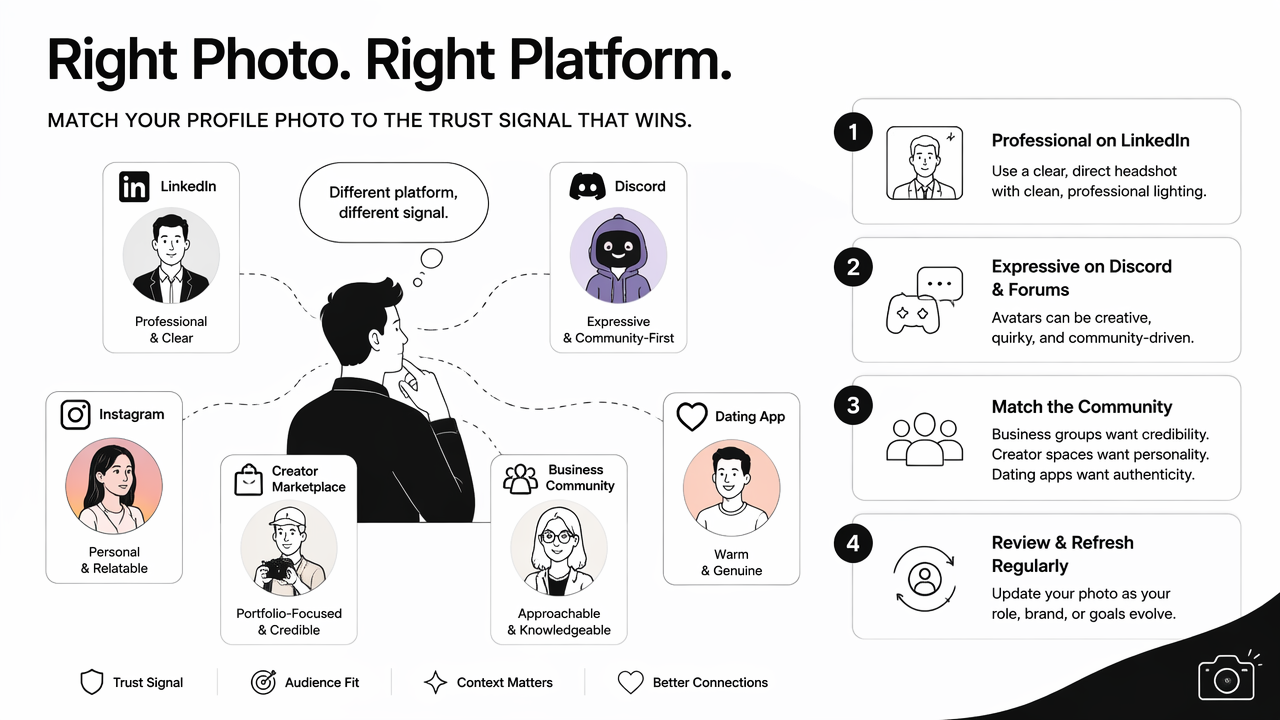
A LinkedIn headshot should usually look clear, direct, and professionally lit. A Discord or forum avatar can be more expressive, but still needs to be recognizable at small sizes. Dating apps tend to work better with natural, authentic portraits than over-edited corporate images.
Raya is a useful example of blurred category lines. Wikipedia describes Raya as an iOS app that began as a dating app and later added professional networking and social discovery features. That blend reflects a broader 2026 reality: one photo may need to support social, romantic, and professional identity at the same time.
Platform-fit comparison table
| Platform or community type | Best photo style | What to avoid | Strong use case |
|---|---|---|---|
| LinkedIn and job networks | Clean headshot, neutral background, visible face | Heavy filters, cropped group shots | Job search, consulting, recruiting |
| Slack, Discord, and forums | Friendly portrait or clear avatar | Tiny details that disappear in circles | Remote teams, niche communities |
| Instagram and creator pages | Branded, expressive, high contrast | Random style changes across profiles | Personal brand and content discovery |
| Dating apps and social discovery | Natural, warm, realistic portrait | Overly corporate studio images | Trust and approachability |
| Founder and business groups | Confident headshot with brand colors | Distracting backgrounds | Networking, partnerships, sales |
Professional profile photos also need technical discipline. Most communities crop images into circles, compress uploads, and show avatars at very small sizes. Strong contrast, centered framing, and simple backgrounds help more than complicated design.
Creators who publish video-led content can extend the same identity system into thumbnails and covers. For example, a profile image can share a color palette with a fitness Shopify TikTok cover generated by AI or a fitness Shopify YouTube thumbnail made with AI.
Which features matter most in an AI profile photo tool?
The most useful AI profile photo tools combine realistic face preservation, platform-ready sizing, style variety, background control, and simple export options.
Competitor pages often highlight speed, free credits, large style libraries, or design templates. Canva emphasizes broad design use across social platforms. Adobe Express focuses on quick online profile picture creation. PFPMaker promotes many tools and styles. HeadshotMaster centers on fast AI headshot generation.
Those features help, but community profile photos need extra judgment. A tool should create images that feel credible inside a specific group, not just visually impressive in isolation.
Research on AI in creative work supports this shift. A 2021 review by Nantheera Anantrasirichai and David Bull examined artificial intelligence in the creative industries, showing how AI has become part of image, video, and design production. A 2023 paper by Pawan Budhwar and coauthors on generative AI and human resource management also shows why AI-created professional identity assets now intersect with hiring and workplace decisions.
Feature checklist for 2026 profile images
A strong generator should include:
- Face consistency: the output should still look like the person in the source image.
- Style range: professional, casual, creator, founder, and community avatar options should be available.
- Background tools: plain, branded, office, outdoor, and transparent backgrounds should be easy to test.
- Crop presets: square and circular-safe framing should work for LinkedIn, Slack, Discord, Instagram, and community platforms.
- Low-friction editing: brightness, contrast, clothing style, and backdrop changes should not require advanced design skills.
- Brand matching: colors and visuals should connect with other assets across social and business profiles.
The Looktara platform fits best when a profile image needs to connect with a wider content system rather than exist as a one-off avatar. A founder, coach, creator, or small business owner can pair a headshot with matching posts, covers, and web visuals.
For example, a personal brand can use a consistent headshot beside a fitness Shopify quote post created with AI and a fitness Shopify website hero image generated by AI. That consistency helps community members recognize the same identity across several touchpoints.
How can a profile photo generator create trustworthy results?
A profile photo generator creates trustworthy results when it starts with clear source images, keeps facial identity stable, and matches the visual expectations of the target community.
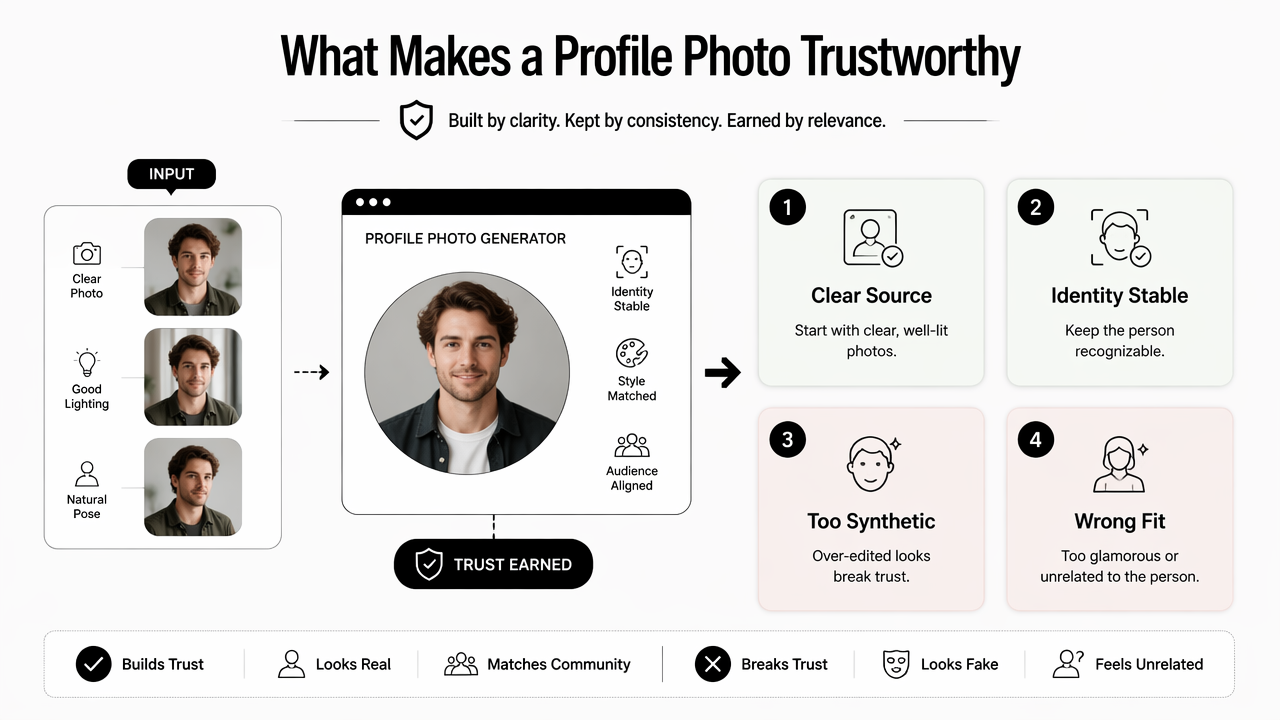
Trust breaks when a profile image looks too synthetic, too glamorous for the setting, or unrelated to the person behind the account. This is especially risky in professional networks, hiring channels, paid communities, and founder groups.
A 2021 review by Lukas Ruff and coauthors on deep and shallow anomaly detection studied methods for detecting unusual patterns in data. While not a profile-photo guide, the topic connects to a broader concern: digital systems increasingly assess whether content appears normal, consistent, or suspicious.
Key insight: realistic does not mean plain. A trustworthy profile photo can be polished, but it should still feel consistent with the person, platform, and purpose.
Picsart, described in the research data as a cross-platform design and editing platform with templates, layer-based editing, and generative AI features, reflects the wider market shift. Profile photos are now part photo editing, part design, and part identity management.
Practical workflow for better outputs
A reliable workflow keeps the image polished without making it feel artificial:
- Choose strong inputs: use sharp, front-facing photos with even lighting.
- Generate several directions: test professional, friendly, creative, and community-specific styles.
- Check small-size clarity: view the image as a tiny circle before selecting it.
- Compare against the platform: a founder group, dating app, and Discord server may need different tones.
- Remove distractions: avoid busy backgrounds, strange hands, distorted accessories, and unnatural skin smoothing.
- Keep one recognizable identity: use related crops and colors across platforms.
Community managers and professionals should also consider moderation norms. Some groups discourage fake-looking avatars. Others welcome stylized icons. The safest choice is usually a clear, human-centered image with light design support.
With Looktara, the strongest use case is visual consistency across a personal brand. A profile photo can sit beside social posts, creator assets, and brand graphics without looking mismatched. For direct brand recall, users can visit looktara.com when profile imagery needs to connect with a broader content presence.
What should profile photo generators prepare for in 2027?
Profile photo generators in 2027 will need stronger identity controls, clearer disclosure norms, better cross-platform exports, and more realistic personalization.
AI-generated portraits are moving beyond novelty. Hiring, creator commerce, private communities, and social discovery all depend on trust. That means generators will likely compete less on raw style count and more on believable identity, consent, and fit.
Three shifts are likely to matter most:
- Identity-safe generation: tools will need better safeguards against misleading likenesses and over-edited faces.
- Community-specific presets: outputs may adapt to LinkedIn, Discord, Slack, Instagram, newsletters, and dating apps with clearer recommendations.
- Brand kits for individuals: colors, backgrounds, icons, and headshots will become linked assets for solo professionals and creators.
The visual identity stack is also expanding. A community profile photo may connect to banner images, podcast artwork, ebook covers, and short-form video covers. A creator could pair a generated avatar with a fitness Shopify podcast cover designed with AI to keep recognition consistent across audio, social, and community channels.
The practical advice for 2026 is simple: avoid locking into a single over-stylized image. A small set of realistic, platform-matched variations will age better than one dramatic AI portrait.
FAQ: Common questions about AI profile photos
Are AI-generated profile photos acceptable for professional communities?
AI-generated profile photos are generally acceptable when they look realistic, represent the person accurately, and follow the community's norms. Professional networks usually favor clear, natural headshots. Highly stylized avatars may work better in forums, gaming groups, or creator communities.
What makes a profile photo look professional online?
A professional online profile photo has clear lighting, a centered face, simple background, natural expression, and enough contrast to remain readable as a small circle. The image should match the platform's purpose, such as hiring, networking, social discovery, or creator branding.
Should the same photo be used across every community?
The same core identity can stay consistent, but each platform may need a different crop, background, or tone. LinkedIn may call for a polished headshot, while Discord or Instagram can support a warmer or more creative version.
How many images should a generator create before choosing one?
A practical batch is usually enough to compare style, lighting, background, and expression without creating decision fatigue. The final choice should be judged at small size and against real profile pages, not only in a large preview window.
Conclusion
A professional profile photo generator for online communities works best when it balances polish with authenticity. The strongest images are clear, recognizable, platform-aware, and consistent with the person's broader digital presence.
For job seekers, founders, creators, freelancers, and dating app users, the next step is to create several profile-ready variations, test them at small sizes, and choose the version that matches the community's trust signals. Looktara can support that process as part of a wider visual identity system, and more profile-friendly brand assets are available on looktara.com.
Generated by EarlySEO.com