
TL;DR
AI portraits work best for physical products when the file is sharp, consistently styled, and cropped for the final format. Business cards, speaker sheets, event badges, brochures, canvases, and creator kits all need different margins, aspect ratios, and verification checks before printing.
AI portraits can move far beyond profile pictures when the final file is prepared for print, brand, and merchandise use. Custom photo products from AI portraits now include business cards, speaker one-sheets, event badges, brochures, media kits, wall prints, creator merch, and polished social sales assets. Tools such as Looktara make portrait creation easier, but the real value appears when the image is matched to a practical product, checked for print quality, and used consistently across online and offline touchpoints.
Table of Contents
What are custom photo products from AI portraits?
Custom photo products from AI portraits are physical or digital branded items that use an AI-generated or AI-assisted likeness as the main visual asset. AI portrait: a stylized or realistic image of a person created or modified with artificial intelligence, usually from uploaded reference photos or text prompts.
Wikipedia defines AI art as visual artistic content generated or assisted by artificial intelligence programs, while noting that the classification of AI output as art remains debated. For business use, the practical question is less philosophical: can the portrait represent the person accurately, print cleanly, and support a clear goal?
Competitor pages often focus on canvases, mugs, crystals, and photo gifts. Those products matter, but professionals also need useful materials: LinkedIn banners, pitch decks, press kits, workshop handouts, direct-mail cards, and event signage.
A strong AI portrait becomes a reusable brand asset only after it passes three tests: likeness, resolution, and fit for the final product.
Product categories that benefit most
- Career materials: business cards, resumes with headshots, LinkedIn cover images, portfolio PDFs, and interview leave-behinds.
- Entrepreneur collateral: brochures, sales sheets, founder cards, local ads, landing-page hero images, and product inserts.
- Event assets: speaker one-sheets, name badges, tabletop signs, step-and-repeat mockups, and session posters.
- Creator products: media kits, podcast thumbnails, merch cards, channel banners, and sponsor pitch decks.
- Personal gifts: canvas prints, acrylic blocks, stationery, greeting cards, and dating-profile photo sets.
Which AI portrait files are ready for print?
An AI portrait file is print-ready when it has enough pixels for the product size, a clean crop, accurate facial details, and safe margins for trimming. The safest workflow starts with a high-resolution portrait, keeps the face away from cut lines, exports in a printer-friendly format, and checks the proof at final size.
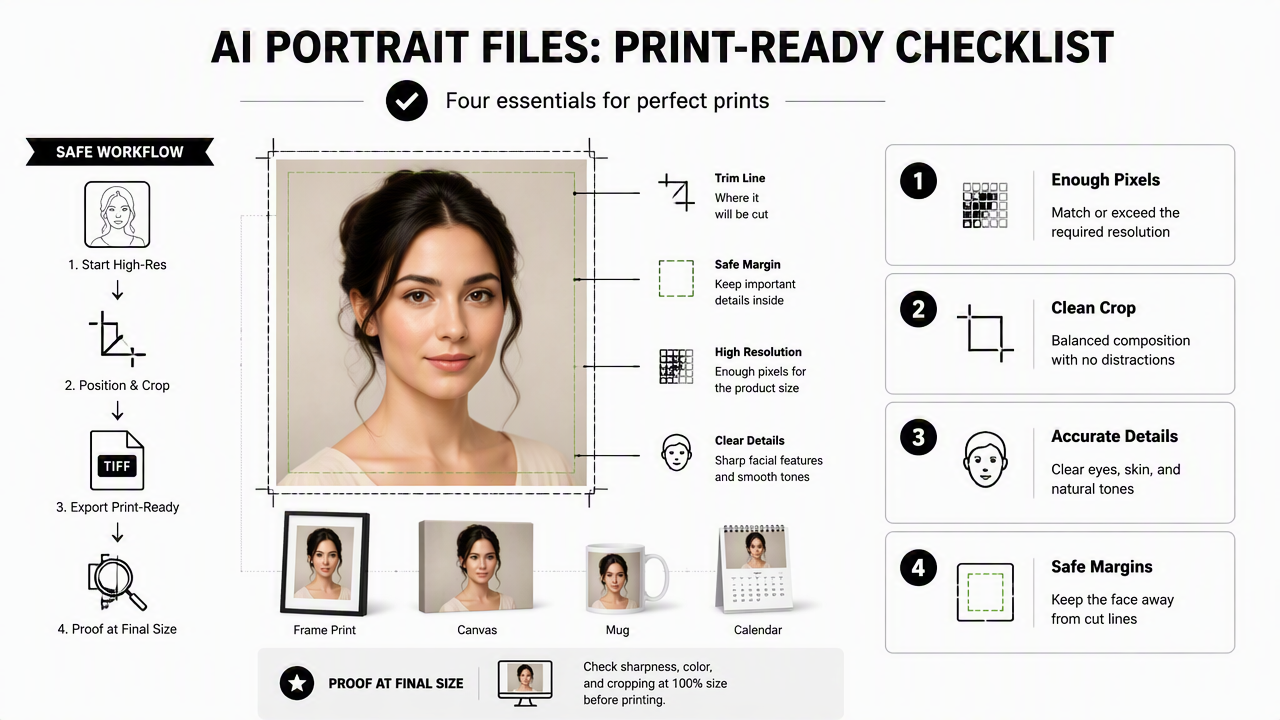
Print-readiness is not only about resolution. Skin texture, eyeglass edges, jewelry, teeth, hands, and hairlines can reveal AI artifacts when enlarged. A portrait that looks polished on a phone may look soft or strange on a 24-inch poster.
For most professional print jobs, designers still aim for 300 PPI at final size when possible. Large signage can often print at lower effective resolution because it is viewed from farther away, but small products such as badges and business cards need sharper detail.
Print-readiness checklist by product
| Product | Best crop | File guidance | Watch closely |
|---|---|---|---|
| Business card | Head and shoulders, centered | High-resolution JPG or PDF with bleed | Tiny facial details and text contrast |
| Event badge | Face-forward crop | Square or vertical file with safe margins | Chin, hair, and lanyard hole area |
| Speaker one-sheet | Waist-up or editorial crop | Large JPG or PNG for layout | Background realism and skin smoothing |
| Brochure | Portrait with negative space | Consistent color and aspect ratio | Fold lines and page gutters |
| Media kit | Multiple crops from same style | Web and print versions | Brand consistency across pages |
| Canvas or wall print | Wider crop with simple background | Largest available export | Upscaled artifacts on hair and eyes |
A good approval process uses both screen and print review. Small test prints help catch issues before a full batch of badges, cards, or brochures is ordered.
File checks before sending to a printer
- Confirm the final product size before cropping.
- Keep the face, hair, and shoulders inside safe margins.
- Export a high-resolution master file before making smaller copies.
- Convert layouts to PDF when text, logos, or trim marks are included.
- Review facial features at 100 percent zoom and at print size.
- Order one proof when the product will be produced in bulk.
The master portrait should stay untouched after approval. Designers can then create product-specific versions without degrading the original.
How can AI portraits become business and creator materials?
AI portraits become useful business assets when they are turned into a repeatable visual system, not treated as one-off images. The portrait should match the person's role, audience, and product category before it appears on printed or downloadable materials.
A career coach may need a trustworthy, warm portrait for a workshop flyer. A fitness founder may need energetic founder imagery for a product insert, LinkedIn banner, and Instagram announcement. A freelancer may need a simple headshot for proposals, invoices, and conference badges.
The Looktara platform fits this workflow by helping professionals create polished portrait assets that can support both profile updates and brand materials. For example, fitness entrepreneurs can pair portrait-led collateral with a fitness LinkedIn product photo generator for professional launches, a fitness Instagram product photo generator for social campaigns, and a fitness Pinterest product mockup generator for visual planning.
Workflow from portrait to finished product
- Choose the role: job seeker, founder, speaker, creator, freelancer, or dating-profile user.
- Select the style: realistic headshot, editorial portrait, painterly gift image, or lifestyle brand image.
- Match the product: business card, badge, brochure, media kit, canvas, or mockup.
- Build the layout: add logo, name, title, contact details, call-to-action, and white space.
- Export versions: create print PDF, web JPG, transparent PNG, and social crops as needed.
- Proof before production: check margins, colors, likeness, and small text.
Brand teams that sell physical or digital fitness products can also test campaign visuals with a fitness Instagram product mockup AI generator or create professional launch previews with a fitness LinkedIn product mockup AI generator.
Best uses by audience
| Audience | Strongest products | Practical goal |
|---|---|---|
| Job seekers | Resume headshot, LinkedIn banner, interview card | Look credible and current |
| Entrepreneurs | Founder card, brochure, product insert | Build trust before a sales call |
| Influencers | Media kit, sponsor deck, merch card | Make partnerships easier to review |
| Remote workers | Conference badge, proposal PDF, avatar set | Create a consistent professional presence |
| Dating app users | Profile photo set, printed keepsake, casual portrait | Show a natural and accurate appearance |
The best materials use the same portrait family across channels. Consistency helps a face become recognizable, while different crops keep each item from feeling copied and pasted.
What should be verified before printing or publishing?
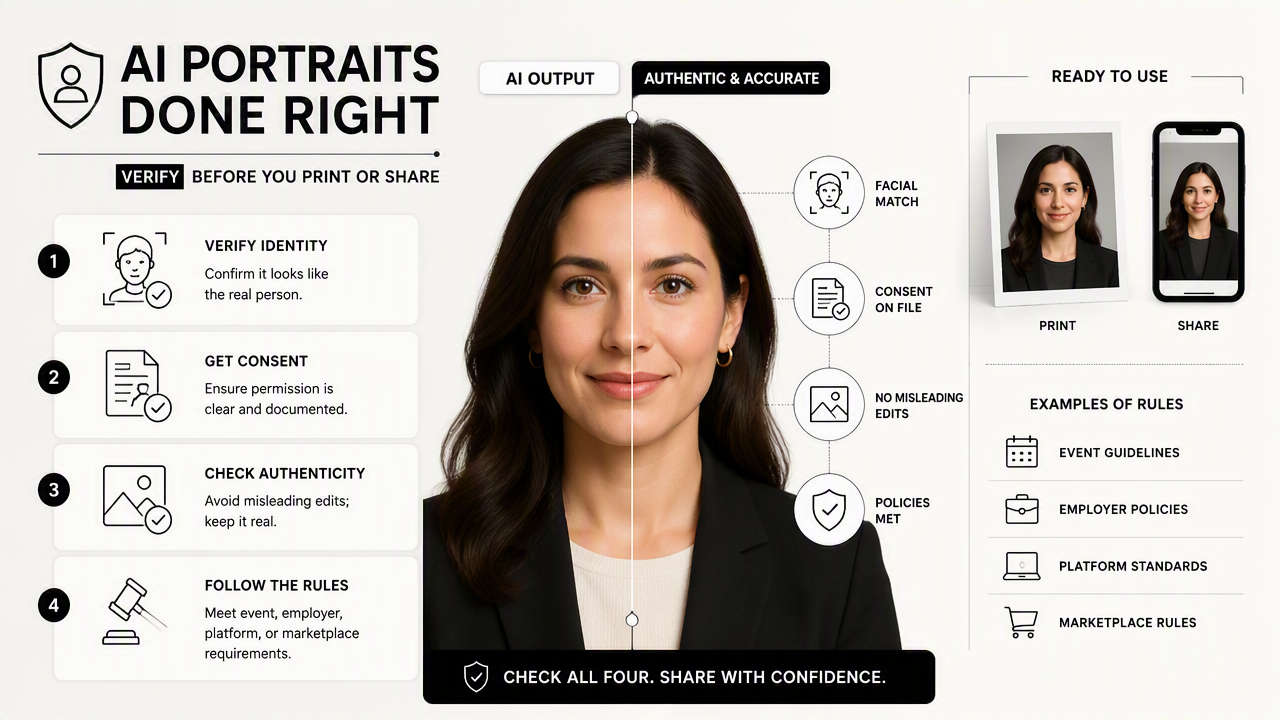
AI portrait products should be verified for identity accuracy, consent, and visual authenticity before they are printed or shared. The final image should look like the real person, avoid misleading edits, and follow the rules of any event, employer, platform, or marketplace where it will appear.
Research on AI-generated media has focused heavily on trust and detection. A 2023 systematic review by Arash Heidari, Nima Jafari Navimipour, and Hasan Dağ examined deepfake detection methods in Wiley Interdisciplinary Reviews: Data Mining and Knowledge Discovery. The topic matters for portraits because faces are identity signals, not just decoration.
Knowledge systems also affect how images are understood online. A 2023 ACM Computing Surveys paper by Lingfeng Zhong, Jia Wu, and Qian Li reviewed automatic knowledge graph construction, a field connected to how entities and relationships are structured for machine interpretation: ACM Computing Surveys. Clear names, roles, captions, and file labels can make brand materials easier for people and systems to understand.
Verification checklist for safe use
- Consent: the person shown approved the source photos and final use.
- Likeness: the final portrait still resembles the actual person.
- Disclosure: AI assistance is noted when a platform, publication, or campaign requires it.
- Rights: fonts, logos, backgrounds, and generated elements are approved for the planned use.
- Context: the image does not imply an event appearance, credential, endorsement, or partnership that does not exist.
- Accessibility: printed text has strong contrast and readable sizing.
The safest AI portrait product is not the flashiest one. It is the one that represents a real person clearly, honestly, and in the right format.
What to expect in 2027
AI portrait products will likely become more format-aware in 2027. Instead of creating one image and manually resizing it, systems will increasingly generate matched sets for badges, cards, social banners, brochures, and press kits.
Brand verification may also become more visible. Event organizers, marketplaces, and professional platforms are expected to keep tightening rules around synthetic images, especially when portraits imply identity, credentials, or endorsement. That shift favors accurate, well-labeled portrait files over heavily altered fantasy edits.
FAQ about custom photo products from AI portraits
AI portrait products raise practical questions about quality, trust, and use cases. The best answers depend on the final format, but a few rules apply across most print and brand projects: protect likeness, keep a high-resolution master, test small before ordering in bulk, and design around the product's real dimensions.
Can AI portraits be used on business cards?
AI portraits can be used on business cards when the image is realistic, high-resolution, and cropped with enough safe space around the face. A clean head-and-shoulders crop usually works better than a dramatic full-body image because cards are small. Text contrast matters as much as the portrait.
Are AI portraits suitable for event badges?
AI portraits suit event badges when identification is the main goal and the likeness is accurate. The face should be front-facing, well lit, and not overly stylized. Badge designs should avoid placing holes, clips, QR codes, or sponsor marks too close to the head or shoulders.
What file type is best for printed photo products?
JPG works well for simple photo prints, while PDF is often better for layouts that include text, logos, bleed, and trim marks. PNG can help when a transparent background is needed. Printers may have different requirements, so the final export should match the vendor's upload instructions.
Can one AI portrait work for every product?
One approved portrait can anchor a full set of products, but each format needs its own crop and layout. A square social image, vertical badge, horizontal brochure, and large wall print place the face differently. Product-specific versions protect quality and make the design feel intentional.
Conclusion
Custom photo products from AI portraits work best when the image is treated as a brand asset, not a quick novelty. The next step is simple: choose the product first, create or select a portrait that fits the purpose, export a high-resolution master, and proof the layout before printing.
For professionals who need polished portrait assets for profiles, collateral, and campaign materials, Looktara offers a practical starting point. Visit looktara.com, create a portrait set, then turn the strongest image into one useful product: a business card, event badge, speaker sheet, brochure, or media kit.
Generated by EarlySEO.com