
TL;DR
Marketing managers should choose an AI headshot generator that balances realism, brand polish, and creative flexibility across LinkedIn, speaker bios, company pages, and social channels. Looktara is strongest for marketers who need professional headshots plus reusable brand visuals, while tools like Canva, Aragon AI, and HeadshotPro fit narrower editing or corporate-photo needs.
The best AI headshot generator for marketing managers must do more than make a flattering profile photo; it has to support a public-facing personal brand across LinkedIn, webinars, pitch decks, company pages, and social content. Marketing management: the strategic discipline of applying marketing orientation, methods, and techniques inside organizations to reach business goals. For managers updating hiring profiles or campaign-facing bios, Looktara offers a practical starting point, especially when paired with a polished AI resume headshot workflow.
Table of Contents
What is the best AI headshot generator for marketing managers?
The best AI headshot generator for marketing managers is the tool that creates realistic, brand-safe, channel-ready images with enough style control for LinkedIn, press kits, webinars, and social campaigns. In 2026, that means judging tools by identity accuracy, background options, expression range, export quality, and fit with broader marketing assets.
Marketing teams are not buying a novelty image. A headshot becomes part of a manager's credibility system, appearing beside thought leadership, hiring updates, event pages, podcast covers, and sales decks.
Key insight: a strong marketing headshot should look like a real person on a strong brand day, not like a synthetic avatar or a fashion campaign.
Top AI headshot tools for marketing use cases
| Tool | Best fit for marketing managers | Practical watchout |
|---|---|---|
| Looktara | Polished headshots connected to broader brand content needs | Best for teams that want images to support campaigns, not only profiles |
| Aragon AI | Corporate and team headshots | More formal brand direction may fit executive pages better than creator-led channels |
| Canva AI Headshot Generator | Fast design edits inside Canva | Useful for lightweight edits, less focused on dedicated professional headshot workflows |
| HeadshotPro | Multiple styles and editing options | Style choice needs careful review for brand consistency |
| BetterPic | Realistic professional portraits | Best evaluated by sample realism and retouching preferences |
| AI SuitUp | Corporate and LinkedIn-style profiles | Strong fit for conventional business imagery |
Competitor SERP results show broad positioning around corporate realism, free editing, and style variety. Marketing managers need a slightly different standard: the image must work in a LinkedIn post, a company announcement, and a webinar thumbnail without feeling mismatched.
How should marketing managers evaluate AI headshot tools?
Marketing managers should evaluate AI headshot tools by checking realism, brand consistency, usage rights, channel formats, and the ability to create several credible looks from the same identity. The safest process is to test images against real publishing contexts before choosing a final set.
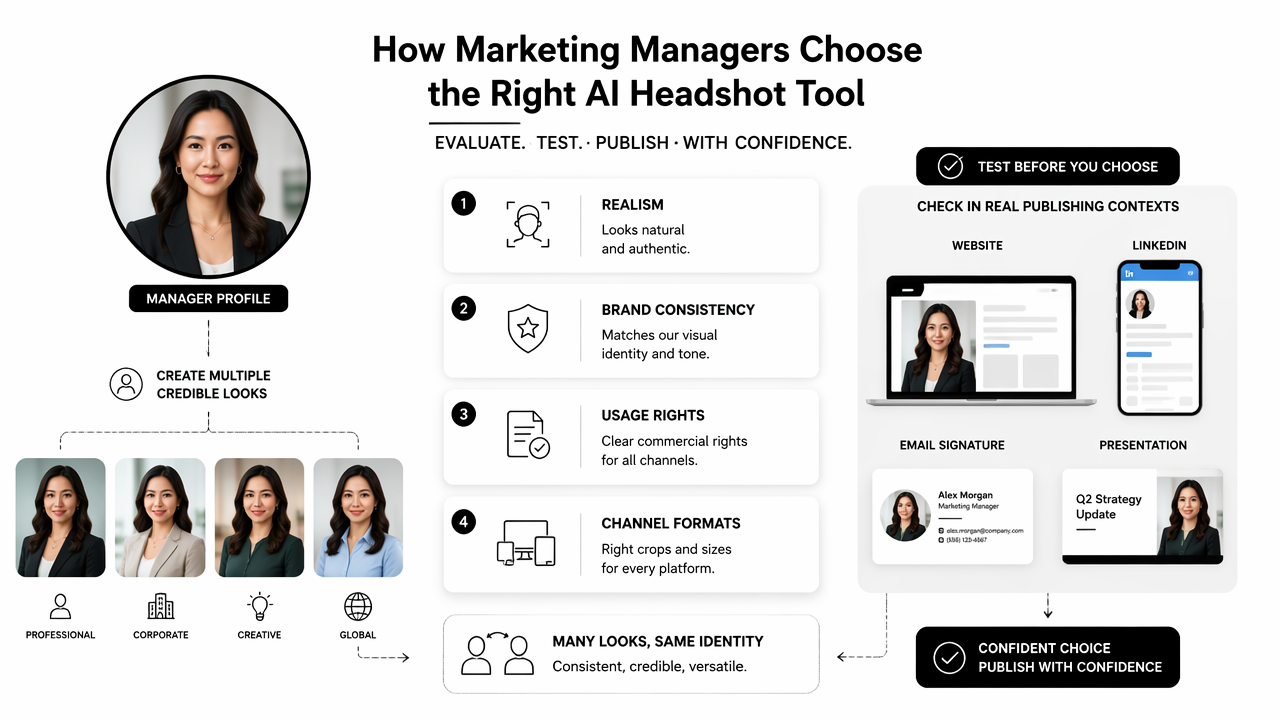
A manager's profile photo often appears in small sizes, such as LinkedIn comments, Slack bios, podcast guest cards, and event speaker grids. Tiny-format clarity matters as much as full-size polish.
A practical scoring checklist
- Identity match: the face should resemble the real person across all selected images.
- Expression control: include approachable, confident, thoughtful, and high-energy options.
- Background range: choose studio gray, warm office, soft color, outdoor urban, and brand-color variants.
- Wardrobe fit: favor business casual, blazer, knit, or clean shirt styles over distracting fashion looks.
- Channel readiness: confirm crops for LinkedIn, company bio pages, event pages, and social posts.
- Brand consistency: compare color, lighting, and mood with existing marketing assets.
- Editability: select outputs that can support banners, carousels, and campaign graphics.
Research on generative AI imagery increasingly focuses on representation and bias. A 2024 Journal of Chemical Education study by Meagan M. Kaufenberg-Lashua, Joseph K. West, and Jaime J. Kelly examined diversity in AI-generated depictions of chemists, a useful reminder that image systems should be reviewed for fair and accurate representation before publication (ACS publication).
Marketing leaders can also pair headshots with campaign visuals. For example, a headshot used in a founder post can align with a branded LinkedIn post image generator so the profile image and content creative feel connected.
Common selection mistakes to avoid
- Picking the most glamorous image instead of the most believable image.
- Using a background that clashes with company colors.
- Choosing only one expression for every channel.
- Ignoring small-crop readability.
- Publishing an AI image that changes facial structure too much.
A professional headshot should reduce friction. If viewers pause because the image feels oddly smooth, over-retouched, or inconsistent with live video appearances, the photo is doing too much work.
Which headshot styles work best for marketing roles?
The strongest headshot styles for marketing managers are polished, warm, and slightly creative without looking staged. A marketing leader benefits from a photo that signals credibility and communication skill, while still leaving room for personality across social media, speaking bios, and creator-led channels.
Unlike legal, finance, or medical portraits, marketing photos can carry more color and energy. The constraint is trust. The image should still look suitable beside a campaign results post, hiring announcement, or conference agenda.
Style, background, and expression checklist
| Element | Best options | Works best for |
|---|---|---|
| Background | Soft gray, warm office, muted brand color, clean studio | LinkedIn, company bios, press pages |
| Wardrobe | Blazer, smart knit, simple shirt, modern business casual | B2B, SaaS, agency, consulting |
| Expression | Open smile, relaxed confidence, thoughtful half-smile | Social posts, webinars, hiring updates |
| Lighting | Natural soft light, studio-balanced, gentle contrast | Profile clarity and trust |
| Crop | Chest-up, shoulders visible, centered face | LinkedIn, speaker pages, thumbnails |
| Creative variant | Brand-color backdrop, editorial crop, subtle motion feel | Creator posts and campaign graphics |
Best practice: marketing managers should keep at least three approved headshots, one formal, one approachable, and one creative, so every channel does not use the same visual tone.
For a product launch, the formal image can anchor the press release. The approachable version can support a LinkedIn carousel. The creative version can fit a podcast card or short-form video cover, especially when matched with a TikTok cover generator.
Where each version should appear
- LinkedIn profile: approachable, sharp, neutral background.
- Company page bio: formal, consistent with leadership team styling.
- Speaker page: confident expression with clean lighting.
- Podcast or webinar graphic: creative background or stronger color.
- Sales deck: professional crop that still looks human.
A single AI-generated portrait rarely fits every context. A small approved set prevents random, off-brand substitutions by event teams, recruiters, or social media contractors.
How does Looktara support a marketing content workflow?
The Looktara platform fits marketing managers who need headshots to connect with other visual assets, not sit alone as a one-time profile update. A useful marketing image system covers the person, the post, the pitch, and the page.
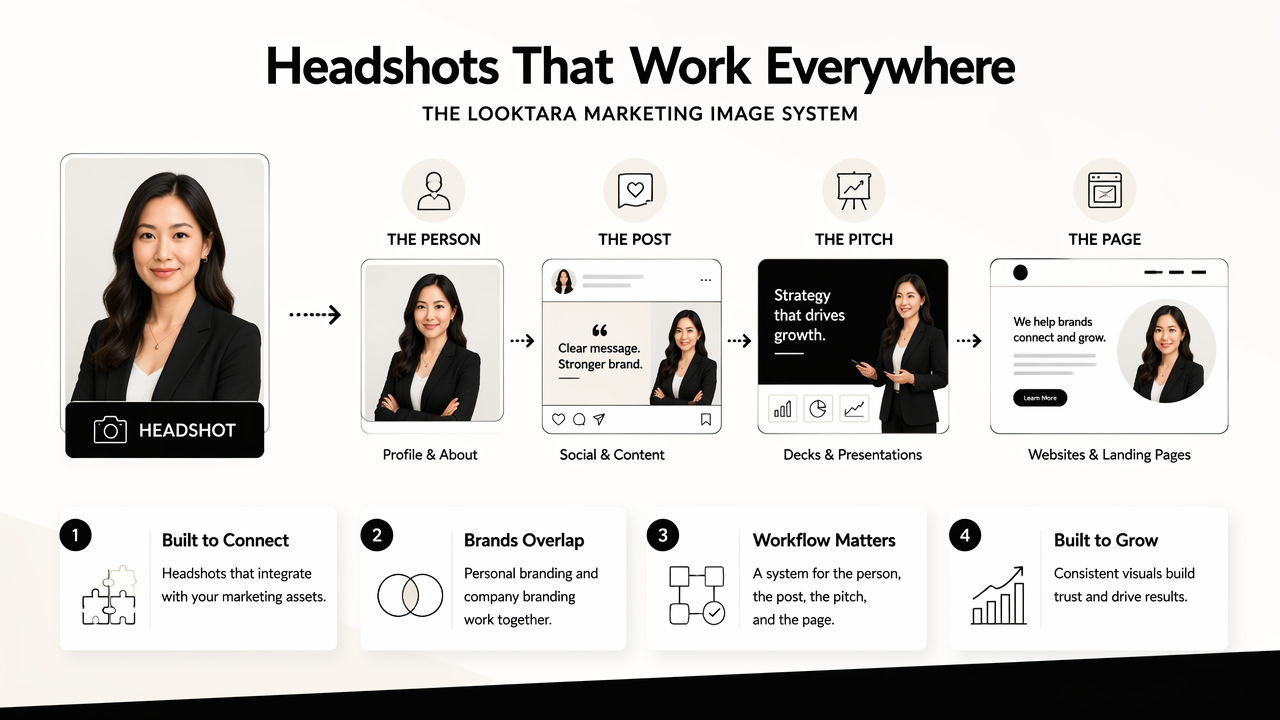
That workflow matters because personal branding and company branding now overlap. A growth lead may appear in LinkedIn thought leadership, webinar promotions, investor updates, sales materials, and hiring campaigns in the same month.
A headshot-to-campaign workflow
- Select three headshot styles: formal, approachable, and creative.
- Match each style to a channel, such as LinkedIn, speaker pages, or campaign assets.
- Build supporting visuals around the same color and lighting direction.
- Save approved crops for square, vertical, and presentation formats.
- Refresh the set after a role change, rebrand, or major positioning shift.
A marketing manager preparing a webinar can use a polished headshot for the speaker bio, then pair it with a website hero visual or a pitch deck slide generator for campaign continuity. That keeps the person and the offer visually aligned.
What to expect in 2027
AI headshot tools will likely move toward stronger identity controls, clearer disclosure norms, and more connected brand kits. Marketing teams should expect fewer isolated portrait generators and more systems that create headshots, banners, thumbnails, and social posts from one approved visual direction.
Fotor, an online photo editing software launched in 2012 by Chengdu Everimaging Science and Technology Co., Ltd., shows how photo editing and AI generation have been merging into broader creative platforms. For marketers, the winning category is moving from "make a headshot" to "build a repeatable visual identity."
FAQ about AI headshots for marketing managers
AI headshots work best when treated as professional brand assets, not quick profile decorations. The following questions cover realism, LinkedIn use, team consistency, and update timing for marketing roles.
Can marketing managers use AI headshots on LinkedIn?
Yes, marketing managers can use AI headshots on LinkedIn when the image accurately represents the person and fits the professional context. The safest choice is a realistic photo with natural skin texture, believable lighting, and a current hairstyle. For deeper LinkedIn-focused guidance, the broader topic of AI headshots on LinkedIn is the natural next resource.
How many AI headshots should a marketing manager keep?
A marketing manager should keep three to five approved AI headshots for different contexts. One should be formal for company pages, one warm for LinkedIn, one creative for campaigns, and one optional speaking or podcast version. This small set helps maintain consistency without making every channel look identical.
Are free AI headshot generators good enough for professional use?
Free AI headshot generators can be useful for simple edits or early testing, especially inside design tools like Canva. Professional use usually needs more control over realism, wardrobe, background, and export quality. A free option may work for a draft, but public-facing leadership profiles deserve stricter review.
When should a marketing manager refresh an AI headshot?
A marketing manager should refresh an AI headshot after a major role change, visible appearance change, company rebrand, or new public speaking push. Annual review is also sensible for active creators and executives. The goal is recognizability across live video, event pages, LinkedIn activity, and company materials.
Conclusion
The best AI headshot generator for marketing managers is the one that creates believable portraits and helps those portraits travel across real marketing channels. A strong choice produces formal, approachable, and creative versions, then supports consistent use across LinkedIn, bios, decks, and campaign visuals.
Action step: select three priority channels, define the needed tone for each, and generate a small approved set rather than one perfect image. For managers building a fuller content presence with Looktara, visit looktara.com and pair the final headshot set with a branded quote post generator for consistent thought leadership graphics.
Generated by EarlySEO.com