
TL;DR
Generate a clean portrait first, then build separate layouts for a TikTok profile picture, video cover, and promotional banner. Keep text editable, check facial details, and preview each crop in its actual placement before publishing.
A TikTok banner portrait isn't a native profile header. An AI photo generator for TikTok banner portraits is most useful when the finished image has a defined destination: a video cover, an in-video promotion, or a graphic advertising the account elsewhere.
Looktara is a portrait-generation option for creators planning those branded assets. The practical workflow separates portrait creation from graphic design, so one recognizable face can support several layouts.
AI banner portrait: An AI-generated or AI-assisted image of a person prepared for a promotional graphic, usually with room for a headline, handle, or offer.
Table of Contents
Where does a TikTok banner portrait appear?
A TikTok banner portrait appears in a promotional graphic, video cover, or video frame rather than a dedicated profile-header banner. The native profile picture is a separate asset with a circular display. Defining the destination first determines the portrait crop, available text space, and final layout.
Creators often use "banner" loosely. A fitness coach might mean a graphic promoting a challenge; a freelancer might mean a website banner inviting visitors to a TikTok account. Those placements need different compositions, even when both feature the same person.
Profile assets versus promotional graphics
| Asset | Intended placement | Portrait treatment | Text approach |
|---|---|---|---|
| Profile picture | TikTok account avatar | Close face crop suitable for a circle | Usually omit small text |
| Video cover | Video thumbnail and profile grid | Face visible in a compact preview | Short topic label |
| In-video promotion | A frame within a vertical video | Portrait beside or above the message | Keep clear of interface overlays |
| External banner | Website, newsletter, or another channel | Wider composition with empty space | Headline plus one action |
TikTok's interface can change, so a live preview is more useful than assuming one permanent safe area. A graphic that looks balanced in an editor may appear differently in the profile grid or feed.
Placement rule: Treat the profile picture, video cover, and promotional banner as separate exports, not interchangeable uploads.
How can creators turn a portrait into a TikTok graphic?
- Choose the TikTok graphic's destination and message.
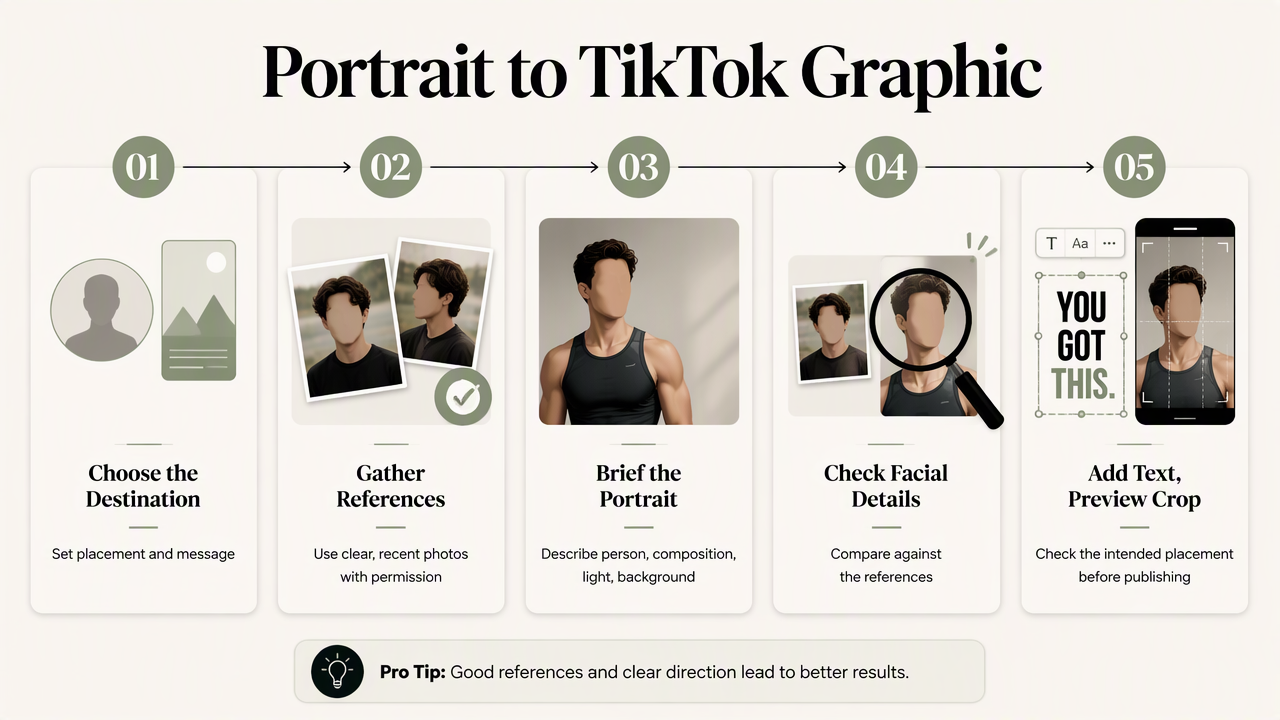
- Gather clear, recent reference photos with permission.
- Generate a portrait with space beside the subject.
- Check facial details against the reference images.
- Add editable text in a design tool.
- Preview the crop in its intended placement before publishing.
A reusable portrait brief
A useful brief describes the person, composition, lighting, and background separately. For a fitness creator promoting a beginner strength series, the portrait could show relaxed shoulders, a plain training top, soft light, and a simple studio background.
Use a composition request such as: Chest-up portrait, subject positioned on the right, uncluttered background, open space on the left for a headline, natural expression, no lettering. Treat that as a starting brief, not a promise of an exact output.
The fitness TikTok banner workflow is a relevant starting point for that campaign. Keeping the message specific makes the image easier to design around.
Choose source photos that show:
- A clear face without heavy filters.
- Consistent, recent appearance.
- A few natural expressions and angles.
- Enough detail to compare eyes, teeth, and hairline.
Identity checks before layout work
Compare the generated face with the references before spending time on typography. Check tooth shape, eye spacing, skin texture, visible accessories, and any distinctive features. A flattering image still needs to look like the person viewers will meet in videos.
For a smile-led portrait, inspect the teeth at full size and again at thumbnail size. A closed-mouth version can provide an alternative when the campaign doesn't need a broad smile.
Keep the headline outside the generated image. Editable text allows spelling corrections, campaign updates, and layout changes without regenerating the face.
Reusable crop and text-placement templates
Reusable portrait templates pair a consistent face with placement-specific crops and editable text zones. The dimensions below are suggested working canvases, not official TikTok banner specifications. Final exports should match the destination's current requirements.
Three practical layout recipes
| Template | Suggested working canvas | Portrait placement | Text placement |
|---|---|---|---|
| Square avatar master | 1080 × 1080 pixels | Centered face with room around the head | No headline; test a circular mask |
| Vertical promotion | 1080 × 1920 pixels | Face in the middle portion, away from outer edges | Short headline beside or above the shoulders |
| External wide banner | 1920 × 1080 pixels | Subject in the left or right third | Message in the opposite third |
These are design starting points. A video-cover crop may need a separate adjustment from the full vertical frame. Avoid treating the suggested canvases as guarantees about TikTok's interface.
For a circular avatar, keep the eyes and mouth comfortably inside the circle. For a vertical promotion, leave flexible space around the portrait so the design can accommodate interface elements after previewing.
Text hierarchy that survives a small preview
A banner needs one main message, not a compressed sales page. A fitness coach's headline might read Beginner Strength Series, with a smaller account handle beneath it. The portrait establishes recognition; the headline explains the content.
- Use one headline and, if necessary, one supporting line.
- Place text over a quiet background rather than facial details.
- Keep strong contrast between lettering and background.
- Test the design at phone size before approving it.
For an ebook promotion, the fitness TikTok ebook-cover workflow offers a related destination. Keep the ebook title prominent and use the portrait as an author cue rather than crowding the cover with campaign copy.
A coordinated campaign without identical crops
The same approved portrait can support a wider promotion through a fitness newsletter banner and a fitness Shopify landing-page banner. Reuse the color palette and expression, but rebuild the layout for each surface.
A simple resource folder should contain the portrait master, editable layouts, approved text, and destination-specific exports. Labeling files by placement and campaign helps prevent an avatar crop from becoming a website banner by accident.
How Looktara handles this
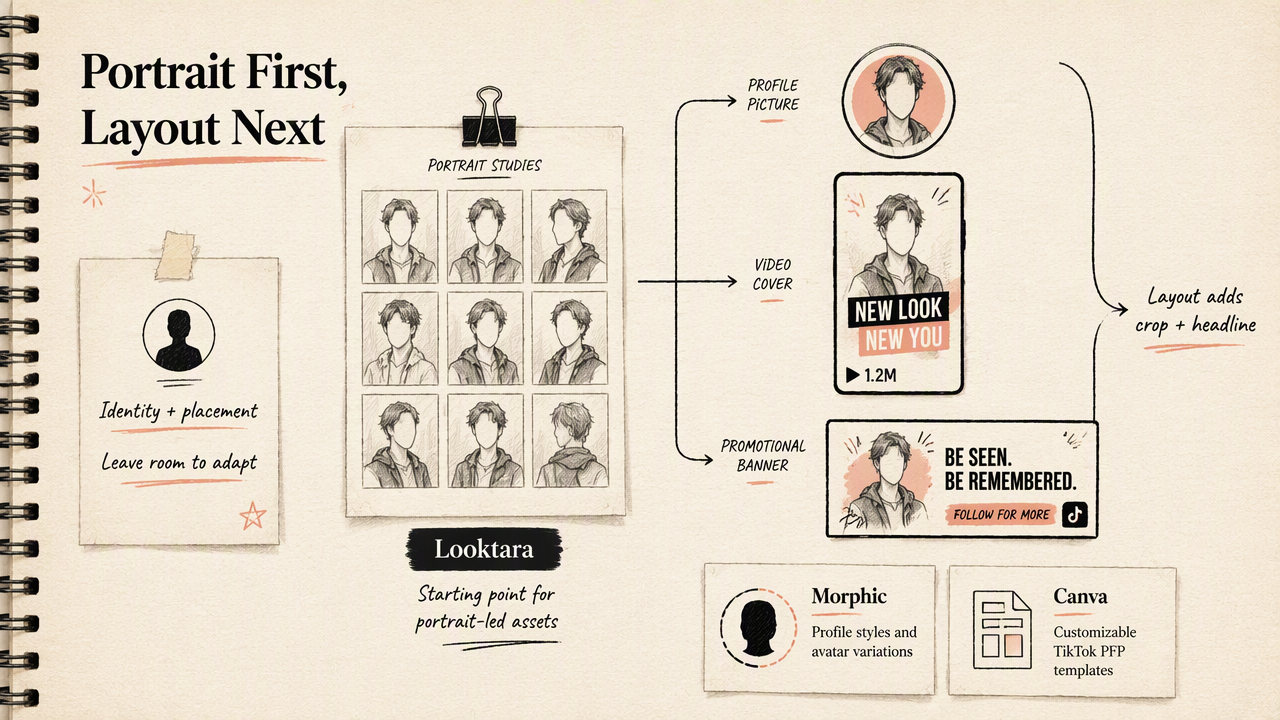
Looktara fits the portrait-creation stage of a TikTok promotional workflow, while layout work gives that portrait its final crop, headline, and campaign context. A clear brief starts with the creator's identity and intended placement, then leaves the graphic adaptable for different publishing surfaces.
Portrait creation, templates, and animation compared
| Option | Focus described in the supplied research | Role in a creator workflow |
|---|---|---|
| Looktara | AI portrait imagery | Starting point for portrait-led branded assets |
| Morphic | TikTok AI profile pictures and avatar variations | Explore profile-picture styles and scenes |
| Canva | Customizable TikTok PFP templates | Arrange a portrait within a template |
| Viggle AI | Photo-based TikTok video generation | Develop motion-based content from an image |
These options address different tasks. A still portrait, a finished graphic, and an animated video are distinct deliverables; selecting by the required output is more useful than comparing them as identical tools.
Who should pick which workflow?
Creators needing recognizable portrait-led branding should start with portrait generation and then build the layout. Those with an approved photo may only need a template editor. Creators whose campaign depends on movement should evaluate a photo-to-video workflow instead.
For fitness professionals carrying the campaign into professional networking, a fitness LinkedIn banner provides a related layout direction. The visual identity can stay consistent while the wording changes from a TikTok series announcement to a professional service message.
FAQ: TikTok portraits and promotional banners
The main decisions concern placement, likeness, and reuse rather than finding one universal banner size.
Does TikTok have a native profile banner?
TikTok profiles don't use a wide header banner in the same way some other social platforms do. A "TikTok banner" generally means a promotional graphic, video element, or external asset. The profile picture remains separate. Before designing, identify the exact screen or channel where the graphic will appear.
Can an AI portrait work as a TikTok profile picture?
An AI portrait can serve as a profile picture when it remains recognizable and works within a circular crop. A close composition and simple background help the face remain readable at a small size. For professional branding, compare the result with recent photographs and choose an expression consistent with the creator's videos.
Should AI generate the headline inside the portrait?
Adding the headline afterward is usually the more flexible approach. Separate text layers allow changes to wording, font size, contrast, and placement without changing the portrait. That separation also makes the same image reusable across a video cover, newsletter promotion, and landing page, each with its own message.
What should a reusable creator asset kit include?
A useful creator asset kit includes a clean portrait master, a square avatar crop, a vertical promotional layout, and an external banner layout. It should also contain editable headlines and a small set of brand colors. Together, those resources support repeatable campaigns while allowing each placement to have its own composition.
Conclusion
Build one portrait, then three purposeful assets
An AI photo generator for TikTok banner portraits works best within a placement-first workflow. The next step is to choose one campaign, prepare reference photos, and create a portrait brief with room for text. Creators considering Looktara can visit looktara.com, then prepare separate avatar, vertical promotion, and wide-banner layouts before publishing.
Generated by EarlySEO.com