
TL;DR
Choose a portrait that preserves the creator's real facial features, then adapt it for the Patreon avatar, membership graphics, and promotional channels. AI offers creative flexibility, but every image needs likeness checks, crop testing, and a review of any implied credentials or endorsements.
A polished Patreon portrait should still look like the person members expect to meet. An AI photo generator for Patreon creator profiles can help develop professional imagery, but the strongest result is a recognizable face rather than a new persona. Looktara is an option for creators exploring AI portraits as part of their visual branding.
AI creator portrait: An AI-generated or AI-edited image intended to represent a creator's identity across profile and promotional placements.
Patreon: An American monetization platform operated by Patreon, Inc., that supports subscriptions and sales of individual digital products.
Table of Contents
What makes an AI Patreon portrait recognizable?
A recognizable AI Patreon portrait preserves the creator's facial proportions, age cues, skin tone, and distinctive features while changing presentation details such as lighting or background. The profile image should connect naturally with existing videos, livestreams, and public photos, so members recognize the same person across different formats.
Identity details matter more than polish
Start with an ordinary, current photo as the reference for evaluating likeness. A flattering result isn't automatically an accurate one. Compare the generated portrait against the reference, especially around the eyes, jawline, hairline, and smile.
- Eyes: Preserve their spacing, shape, and natural expression.
- Teeth: Check tooth shape, spacing, and visible gaps rather than accepting a generic perfect smile.
- Skin: Keep identifiable features such as freckles or birthmarks when they matter to recognition.
- Age cues: Retain a believable appearance consistent with recent public imagery.
Creative styling can communicate the page's theme without changing identity. A writing creator might choose a quiet desk setting; a fitness educator might prefer a plain studio background. Neither needs invented credentials or elaborate scenery.
Choose literal or illustrated representation
A realistic portrait suits a creator whose face appears regularly in public content. An illustrated avatar may suit an established character-led brand, provided the membership page makes that presentation clear.
The portrait's job is recognition. The page description explains the membership offer.
How can creators build a consistent portrait workflow?
- Gather current reference photos for the Patreon portrait.
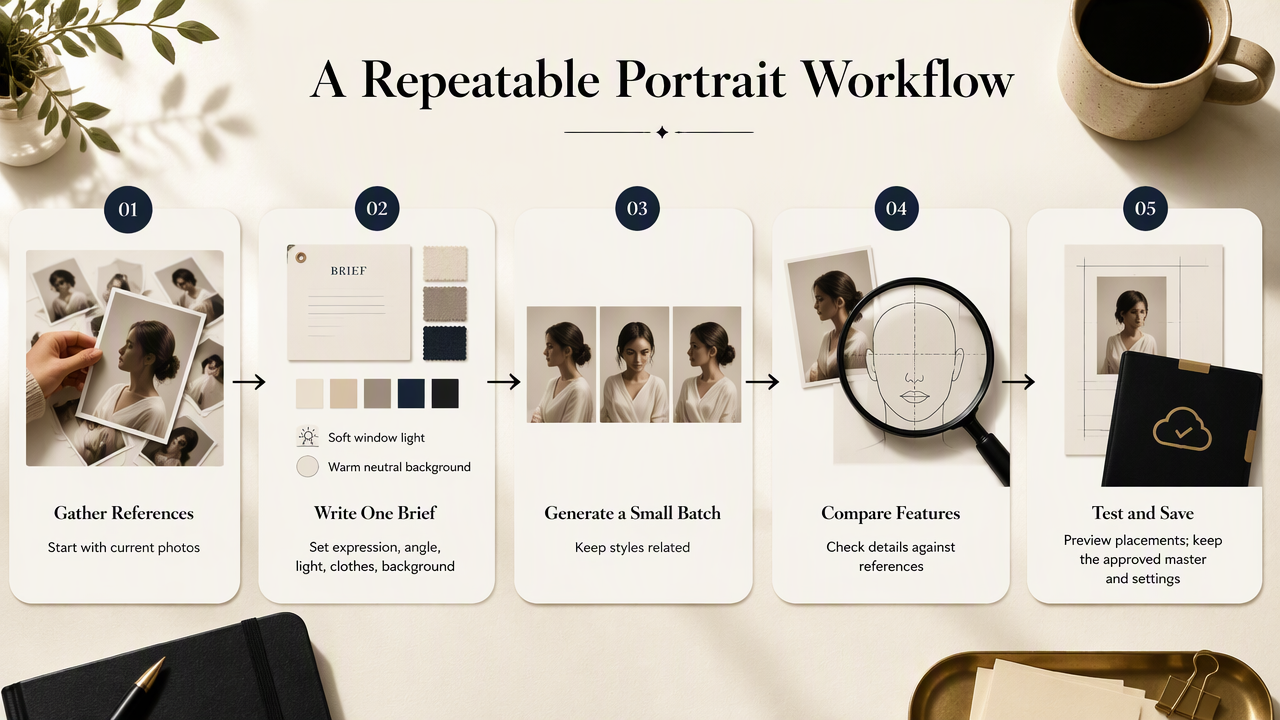
- Define one visual brief covering expression, clothing, and background.
- Generate a small batch rather than unrelated styles.
- Compare facial details against the references.
- Test shortlisted images in actual page placements.
- Save an approved master image and its settings.
Write a brief that controls presentation
Keep the brief specific enough to repeat. Record the desired expression, camera angle, lighting, clothing, and background colors. A useful example is: head-and-shoulders portrait, relaxed closed-mouth smile, plain navy shirt, soft window light, warm neutral background.
Reference photos should show the creator clearly, without heavy filters or obstructed facial features. Before uploading, check the service's current image-use terms, retention information, and deletion options. Those details need verification in 2026 rather than assumptions based on an older review.
Review meaning as well as appearance
A portrait can communicate claims through clothing, surroundings, and props. A lab coat may imply medical expertise; a recognizable company logo may suggest employment or sponsorship. Approval should cover what the image appears to promise, not just whether it looks attractive.
Use this pre-publication checklist:
- Confirm permission for every identifiable person depicted.
- Remove logos or uniforms that imply an unsupported affiliation.
- Exclude awards, credentials, or event settings that aren't real.
- Check that an illustrated character isn't presented as a real person.
- Explain substantial synthetic styling when context could otherwise mislead.
Felipe Romero Moreno's 2024 article on generative AI, deepfakes, and human rights examines harmful synthetic content through a rights-based approach. That subject makes consent and identity representation relevant review questions; the supplied research does not establish a universal disclosure rule.
Keep a reusable approval record
Store the approved portrait alongside its brief, reference date, and intended placements. A simple record helps a creator or designer reproduce the visual direction later without rebuilding the brand from scratch.
How Looktara fits a creator portrait workflow
Looktara fits the portrait-development stage of a Patreon branding workflow, with the creator's approved visual brief serving as the basis for evaluating potential images. The practical goal is a reusable portrait direction that supports the membership page and related channels, rather than a different identity for every placement.
Start with one clear portrait direction
Creators considering the platform can visit looktara.com to review its current offering and decide whether it matches the brief. Selection criteria should include the desired visual style, available output options, and the creator's publishing needs. No particular price, turnaround time, or likeness guarantee should be assumed without checking current product information.
A fitness creator promoting Patreon through social media can explore the fitness Instagram profile-picture option. A creator who also markets professional services can consider the fitness LinkedIn profile-picture option for that separate channel.
Keep the portrait distinct from the offer
The face establishes who runs the page; membership graphics explain what subscribers receive. Keeping those jobs separate makes updates easier when a creator introduces a new tier or changes a benefit.
- Use the approved portrait as the identity anchor.
- Assign consistent colors and typography to membership graphics.
- Reserve text for benefits, schedules, and tier names.
- Keep an unlabelled master portrait for future adaptations.
Where should the portrait appear on Patreon?
The creator portrait should anchor the Patreon profile avatar, while related crops can support welcome graphics and membership promotions. Each placement needs its own composition: the avatar prioritizes facial recognition, a banner needs breathing room, and a tier graphic should make the benefit easier to understand.
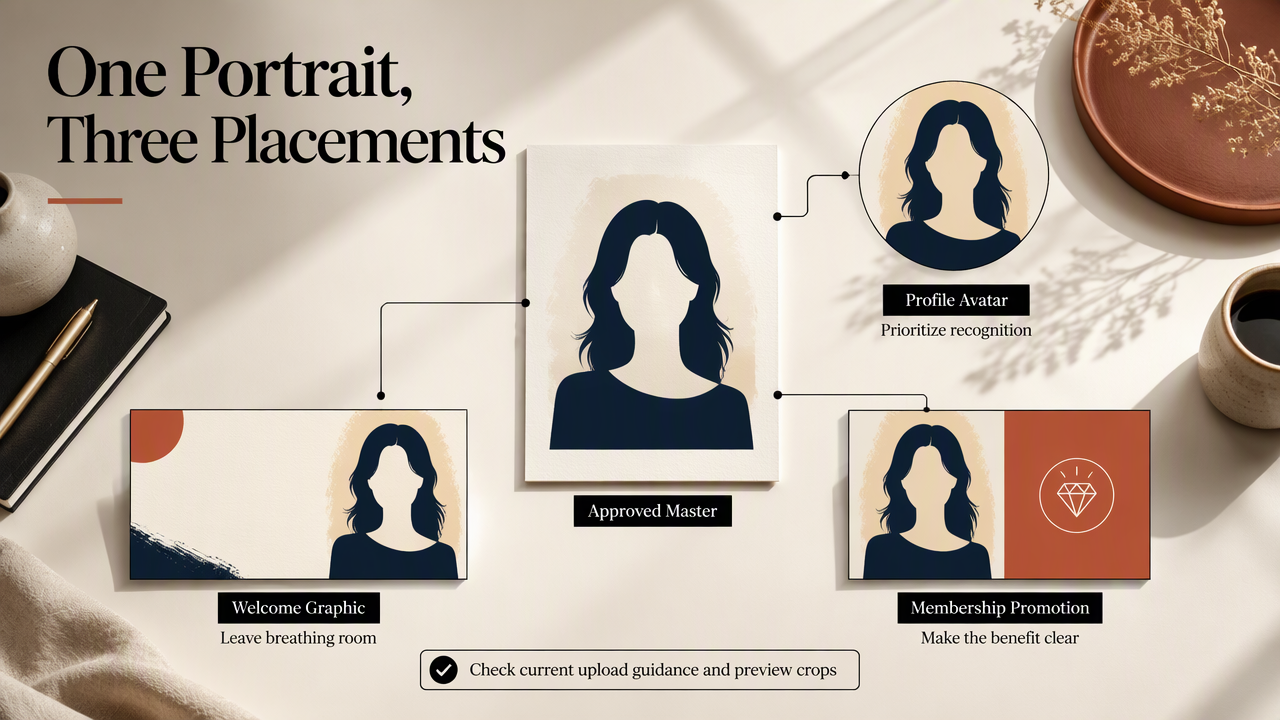
Match the crop to the placement
These are composition recommendations, not official Patreon dimensions. Check the platform's current upload guidance and preview controls before exporting final files.
| Placement | Recommended composition | Approval check |
|---|---|---|
| Profile avatar | Centered head-and-shoulders crop | Face remains clear in the displayed mask |
| Page header or banner | Wider composition with open space | Face and text survive narrow previews |
| Membership graphic | Small portrait beside benefit information | Tier name remains easy to read |
| Welcome-post image | Larger portrait with a simple setting | Expression matches the page's tone |
| Off-platform promotion | Channel-specific crop of the approved image | Creator remains recognizable without surrounding text |
Test the smallest version first
Preview the avatar at approximately 48 pixels wide as a practical stress test, not a Patreon requirement. Then inspect it on a phone and desktop. If the eyes disappear or the face becomes hard to distinguish, simplify the background and tighten the crop.
Check square and circular masks where relevant to the destination. Leave room above the hair and beside the face, then confirm that no important feature sits against the edge. A wide banner should be composed separately rather than stretched from a small avatar.
A fitness membership promoted by email can use a related newsletter profile portrait. Visual discovery campaigns can use a matching Pinterest profile portrait, while adapting supporting graphics to that channel.
Keep promotional context attached
Images can circulate beyond their original page. Joanna Nowotny and Julian Reidy's 2022 book on internet memes addresses the forms and consequences of that phenomenon, not Patreon conversion performance. A practical safeguard is to keep the creator name and membership context visible on shareable promotional graphics.
FAQ: Patreon portrait accuracy and publishing
Patreon portrait decisions should account for audience expectations, image rights, and the platform's current rules as well as visual quality.
Review the finished image in context before publication, not only as a standalone file.
Should a creator disclose an AI-generated portrait?
Disclosure is useful when a portrait is substantially synthetic or could create a false impression about the creator's appearance or circumstances. A short image note can explain that AI assisted the styling. Creators should also check current Patreon requirements and applicable rules, since the supplied research does not establish a single disclosure obligation for every portrait.
Can an AI portrait replace all real creator photos?
An AI portrait can serve as the main avatar, but real photos and videos provide additional context for audiences. A membership based on personal teaching, coaching, or commentary benefits from recognizable continuity between the portrait and public content. An established fictional-character brand may take a different approach, with clear descriptions of the character and creator.
Does an AI portrait change adult-content requirements?
An AI portrait doesn't determine whether a Patreon page needs an adult-content designation or an age check. Creators publishing adult material should consult Patreon's current rules and any relevant generator restrictions. An "Are you 18 years or older?" prompt is not a substitute for reviewing the underlying content, permissions, and publishing requirements.
What resources should a creator check before uploading?
The relevant resources are Patreon's current image guidance and community rules, plus the generator company's terms, privacy information, and support documentation. Creators should confirm permitted uses, treatment of uploaded photos, and available deletion controls. Save the final image, approval notes, and relevant licensing information together so later updates have a clear starting point.
Conclusion
The best AI photo generator for Patreon creator profiles supports a recognizable identity and a repeatable publishing process. The next step is concrete: prepare current references, write one portrait brief, and approve an avatar plus a wider promotional crop. Creators considering Looktara can evaluate its current offering against that brief, then publish only after checking likeness, placement, and implied claims.
Generated by EarlySEO.com