
TL;DR
Executive assistants need a headshot that communicates reliability, judgment, warmth, and executive presence without looking stiff. The strongest AI-generated option uses polished business attire, a clean background, natural expression, and crops that work across LinkedIn, email signatures, company directories, and applications.
A strong AI headshot for executive assistants can change how a profile feels before a recruiter, executive, client, or vendor reads a single line. Executive assistants often represent senior leaders, manage sensitive communication, and coordinate across departments, so a polished but approachable image matters. [AI headshot]: a computer-generated or AI-enhanced professional portrait created from uploaded photos and styled to resemble a studio business headshot. Platforms such as Looktara help career professionals create profile-ready images without booking a studio session, which is useful when LinkedIn, a company directory, and an email signature all need an update at once.
Table of Contents
What is an AI headshot for executive assistants?
An AI headshot for executive assistants is a professional portrait generated from existing photos and styled for administrative leadership roles, including LinkedIn, resumes, company directories, email signatures, and job applications. The goal is not glamour or heavy retouching. The goal is a credible image that signals calm organization, discretion, and executive-level communication.
LinkedIn: LinkedIn is a global business and employment-oriented social networking service used for professional networking and career development.
Executive assistant: an administrative professional who provides office, communication, scheduling, and coordination support to leaders or organizations.
A good executive assistant headshot should look like a person trusted with calendars, clients, confidential information, and fast decisions.
AI portraits differ from casual profile photos because they standardize lighting, clothing, framing, and background. They also help create consistent images across multiple professional channels, a gap many AI headshot competitors address broadly but rarely tailor to administrative and executive support roles.
Research on AI ethics matters here. Inga Ulnicane's 2024 article on intersectionality in artificial intelligence examines concerns around fairness and representation, which applies to AI portrait tools because professional images should preserve identity rather than flatten it into a generic corporate look.
Which headshot style works best for executive assistants?
The best headshot style for executive assistants is polished, warm, and organized, with business attire, soft lighting, a neutral background, and a confident expression. The image should feel senior enough for executive-facing work, but not so formal that it appears cold, rigid, or disconnected from daily collaboration.
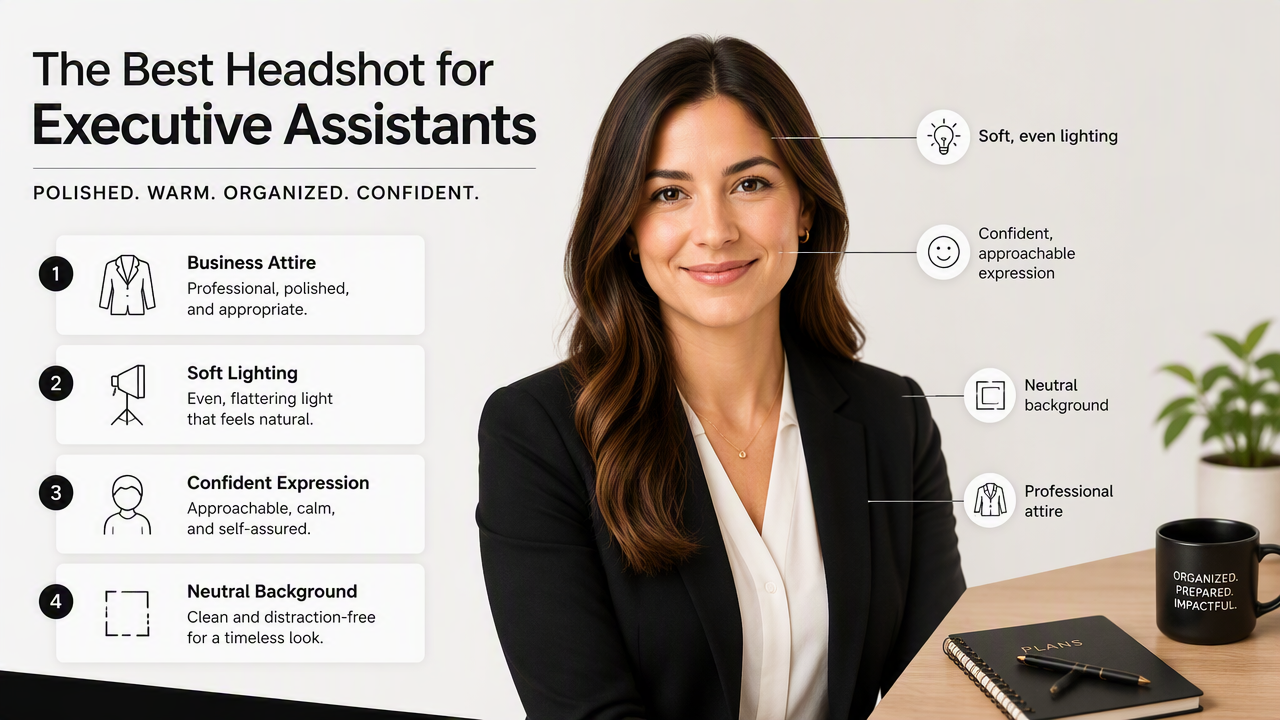
Executive assistant branding sits between corporate authority and service orientation. A CEO may choose a dramatic portrait with bold lighting. A sales leader may choose a high-energy image. An EA usually benefits from visual cues that say steady, responsive, trusted, and detail-aware.
Executive assistant headshot style guide
| Element | Best choice | Why it works |
|---|---|---|
| Outfit | Blazer, structured cardigan, blouse, knit top, or button-down | Signals polish without looking overdone |
| Color | Navy, charcoal, cream, soft blue, black, burgundy, forest green | Reads professional across screens and directories |
| Background | Light gray, warm office, soft studio, blurred workspace | Keeps attention on the face |
| Expression | Relaxed smile or calm half-smile | Communicates trust and approachability |
| Crop | Head and upper shoulders, eyes near top third | Works for LinkedIn, email, and internal systems |
| Retouching | Light skin smoothing, natural texture kept | Looks credible and current |
A practical rule: the image should look appropriate beside a senior executive's profile while still feeling accessible to employees, candidates, vendors, and clients.
Outfit choice can shift the message. A blazer says boardroom-ready. A refined cardigan says warm and organized. A simple blouse or knit top says approachable and modern. Loud prints, heavy jewelry, and very casual tops tend to distract in small profile-photo formats.
For professionals comparing different resume-photo styles, Looktara also offers related generators such as a resume headshot AI generator for Shopify-oriented profiles, though executive assistants should keep the final look more corporate than creator-focused.
How should executive assistants create AI headshots that look authentic?
Executive assistants should create authentic AI headshots by starting with clear selfies, choosing conservative business styling, checking facial accuracy, avoiding extreme retouching, and exporting versions for each professional platform. The best result looks like the same person on a strong office day, not a synthetic model.
Step-by-step workflow for profile-ready results
- Choose clear source photos. Use recent images with different angles, normal expressions, and good lighting.
- Select a professional style. Pick business attire, neutral backgrounds, and natural lighting over fashion or influencer presets.
- Review identity accuracy. Check eyes, smile, jawline, hairline, skin tone, glasses, and facial proportions.
- Reject overprocessed images. Avoid plastic skin, distorted hands, strange teeth, or mismatched earrings.
- Create channel-specific crops. Save square, vertical, and tight-crop versions for LinkedIn, resumes, directories, and email.
- Ask for a work-context review. A trusted colleague can flag whether the image feels aligned with the role.
Authenticity matters because executive assistants often work as the first human bridge between leadership and the rest of the organization. A photo that looks too artificial can create friction, especially in hiring, client-facing, or high-trust environments.
Common mistakes to avoid
- Overly glamorous lighting that feels closer to a dating profile than a business portrait
- Clothing that conflicts with the company's culture or seniority level
- Busy backgrounds with visible objects, logos, or fake-looking offices
- Crops that cut off the chin, hair, or shoulders awkwardly
- AI artifacts around glasses, teeth, earrings, collars, and hair texture
- A facial expression that looks tense, bored, or exaggerated
Synthetic media trust is a wider issue. Zahra Khanjani, Gabrielle Watson, and Vandana P. Janeja's 2023 survey on audio deepfakes focuses on audio, but it reflects the same broader concern: AI-generated media needs careful review because realism and trust do not always move together.
A good standard is simple: if the person would feel comfortable using the image in a company announcement, job application, and executive calendar profile, it is probably professional enough.
Where should executive assistants use an AI-generated headshot?
Executive assistants should use an AI-generated headshot anywhere professional trust forms quickly, including LinkedIn, company directories, email signatures, resumes, conference bios, vendor portals, and job applications. Each channel needs a slightly different crop, but the same visual identity should carry across every placement.
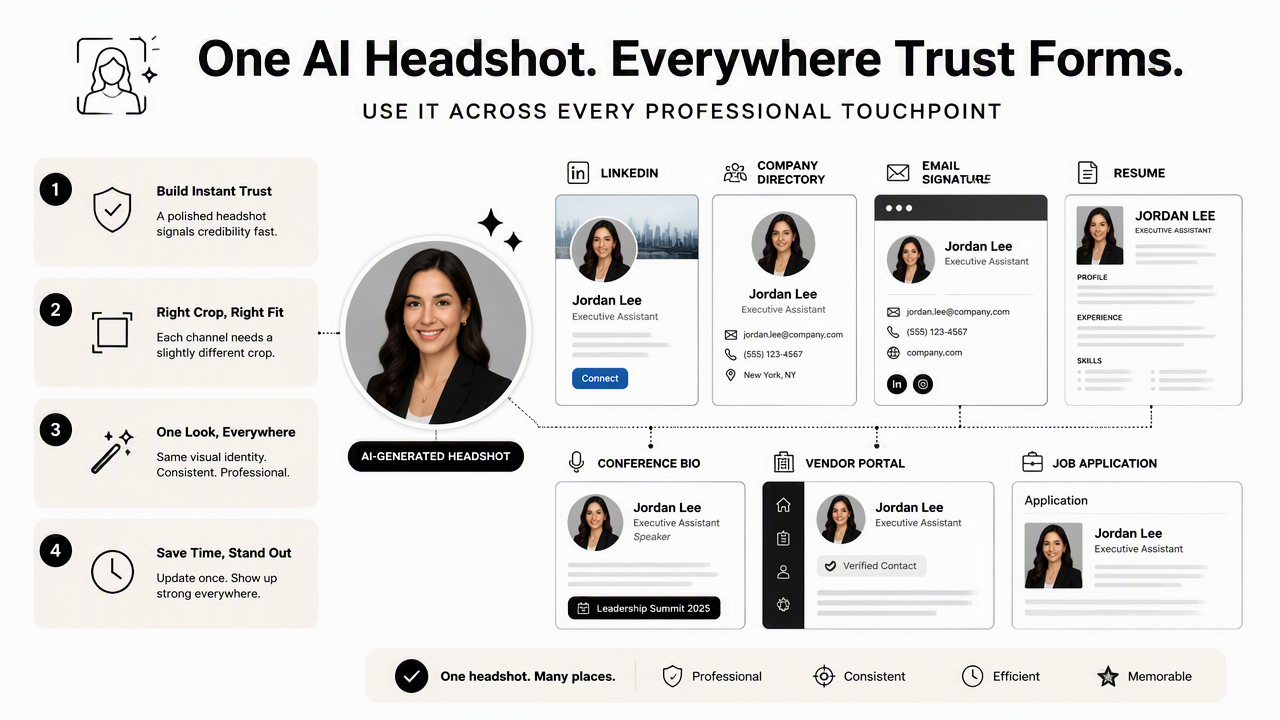
LinkedIn is usually the first priority because it supports career mobility and professional networking. A clean headshot helps recruiters and hiring managers connect a name with a credible administrative leader. For job seekers, the image should match the resume's tone: polished, current, and not overly stylized.
Company directories need consistency. An executive assistant may appear beside executives, chiefs of staff, HR leaders, and operations teams. A headshot with a neutral background and balanced lighting avoids looking out of place in a grid of employee profiles.
Email signatures need tighter framing because the image often appears very small. A calm smile, uncluttered background, and high contrast between face, hair, and clothing help the photo remain readable at thumbnail size.
Best crop by use case
| Use case | Recommended crop | Styling note |
|---|---|---|
| LinkedIn profile | Square, head and shoulders | Strongest all-purpose professional crop |
| Email signature | Tight square or circle crop | Face should remain clear at small size |
| Company directory | Square, centered face | Match team style if possible |
| Resume or CV | Small rectangular crop | Use only where profile photos are expected |
| Job application portal | Square or vertical crop | Keep background plain and conservative |
| Speaker or event bio | Vertical portrait | Slightly warmer expression works well |
A related visual-brand use case appears in creator and social search contexts. For example, a Pinterest-focused resume headshot generator may suit more visual personal-brand profiles, while executive assistant materials usually call for a cleaner corporate finish.
The Looktara platform can be especially helpful when a professional needs several coordinated versions of one visual identity. A square LinkedIn image, a tighter email crop, and a directory-ready portrait can all follow the same style direction. For brand recall, head to looktara.com when comparing options for profile-image updates.
What should executive assistants expect from AI headshots in 2027?
AI headshots in 2027 will likely become more role-specific, identity-aware, and platform-ready, with better controls for attire, background, expression, and consistent crops. For executive assistants, the strongest tools will not just create attractive portraits. They will help produce images that fit workplace trust, accessibility, and professional context.
Machine learning is already widely studied across business functions. Daniel Hoang and Kevin Wiegratz's 2022 article on machine learning methods in finance reviews recent applications and prospects in a highly regulated field, showing how AI adoption often grows when accuracy, oversight, and workflow fit improve.
The same pattern applies to professional portraits. Users will expect more control, not just more realism. A tool that generates 100 glossy images but only two usable business portraits will feel dated. Better prompts, stronger identity preservation, and clearer privacy practices will matter more than novelty.
2027 features likely to matter
- Role-based presets for executive assistants, chiefs of staff, operations managers, founders, and consultants
- Brand-style matching for company directories and team pages
- More accurate glasses, hair, skin tone, and facial structure handling
- Channel exports sized for LinkedIn, email signatures, applicant systems, and internal profiles
- Authenticity checks that flag over-retouching or unrealistic details
The most useful future tools will help professionals look like themselves on their best workday. That is the right standard for executive assistants, whose work depends on trust more than flash.
Frequently asked questions
Can an AI headshot be used on LinkedIn for an executive assistant role?
Yes, an AI-generated headshot can be used on LinkedIn when it accurately represents the person and looks professional. The image should use natural lighting, realistic facial details, business-appropriate clothing, and a clean crop. LinkedIn is used for professional networking and career development, so the photo should support credibility rather than draw attention to AI styling.
What should an executive assistant wear for an AI headshot?
An executive assistant should choose attire that suggests reliability and executive access, such as a blazer, blouse, button-down, polished knit, or structured cardigan. Navy, charcoal, cream, black, and muted jewel tones work well. The outfit should match the organization's culture while staying formal enough for recruiters, executives, and external contacts.
Are AI headshots professional enough for company directories?
AI headshots can be professional enough for company directories if they match the organization's visual standards and preserve a realistic likeness. The safest choice is a neutral background, centered square crop, natural expression, and minimal retouching. Any image with visible AI artifacts around glasses, teeth, hair, or clothing should be replaced.
How many versions should an executive assistant create?
Three to five versions are usually enough: a LinkedIn square crop, a tighter email-signature image, a company-directory version, a resume or application version, and an optional warmer portrait for bios or events. Consistency matters more than quantity, so each version should look like the same professional identity across channels.
Conclusion
The best AI headshot for executive assistants presents a person as organized, warm, discreet, and ready to represent senior leadership. The practical next step is to gather recent source photos, choose business styling, create several platform-specific crops, and reject any image that looks overprocessed. Looktara can help produce polished options for LinkedIn, email signatures, directories, and applications; visit looktara.com when ready to refresh a professional profile with a headshot that looks credible in real workplace contexts.
Generated by EarlySEO.com