
TL;DR
AI headshots render clothing most reliably when source photos show simple, fitted, visible garments with clean collars and minimal patterns. The safest workflow is to choose plain outfits, avoid logos and uniforms, then reject images with warped necklines, wrong colors, fake branding, or fabric artifacts.
A polished AI headshot can lose credibility fast if a blazer lapel bends oddly, a collar melts into skin, or a company color shifts from navy to black. AI headshot clothing accuracy matters because clothing signals role, industry, and trust before a face is even studied. In 2026, stronger multimodal models have improved style transfer, but clothing remains one of the easiest places to spot an artificial image.
Table of Contents
What is AI headshot clothing accuracy?
AI headshot clothing accuracy is the degree to which an AI-generated headshot preserves or realistically recreates garments, including collars, fit, fabric texture, logos, patterns, uniforms, and brand colors. High accuracy means the outfit looks intentional, professional, and physically possible, even when the final image uses a new background or lighting style.
Terminology: Clothing fidelity means the visual consistency of garments across source photos and generated outputs, especially around edges, folds, fasteners, and color.
Modern generators do not simply copy a shirt pixel for pixel. They infer what clothing probably should look like from training data, prompts, and uploaded examples. Research on visual instruction tuning by Liu, Li, and Wu in 2023 examined how vision-language systems follow image-based instructions, which helps explain why models can interpret outfits but still change details during generation: Visual Instruction Tuning.
Key insight: AI headshots should be judged less like a clothing catalog image and more like a professional portrait. The outfit must look believable, flattering, and appropriate, not perfectly forensic.
For career profiles, the standard is practical realism. A LinkedIn recruiter rarely needs stitch-level precision, but distorted collars or invented badges can make a candidate look careless. For creators, founders, and consultants, the same issue affects brand trust.
Why does AI change collars, logos, patterns, and uniforms?
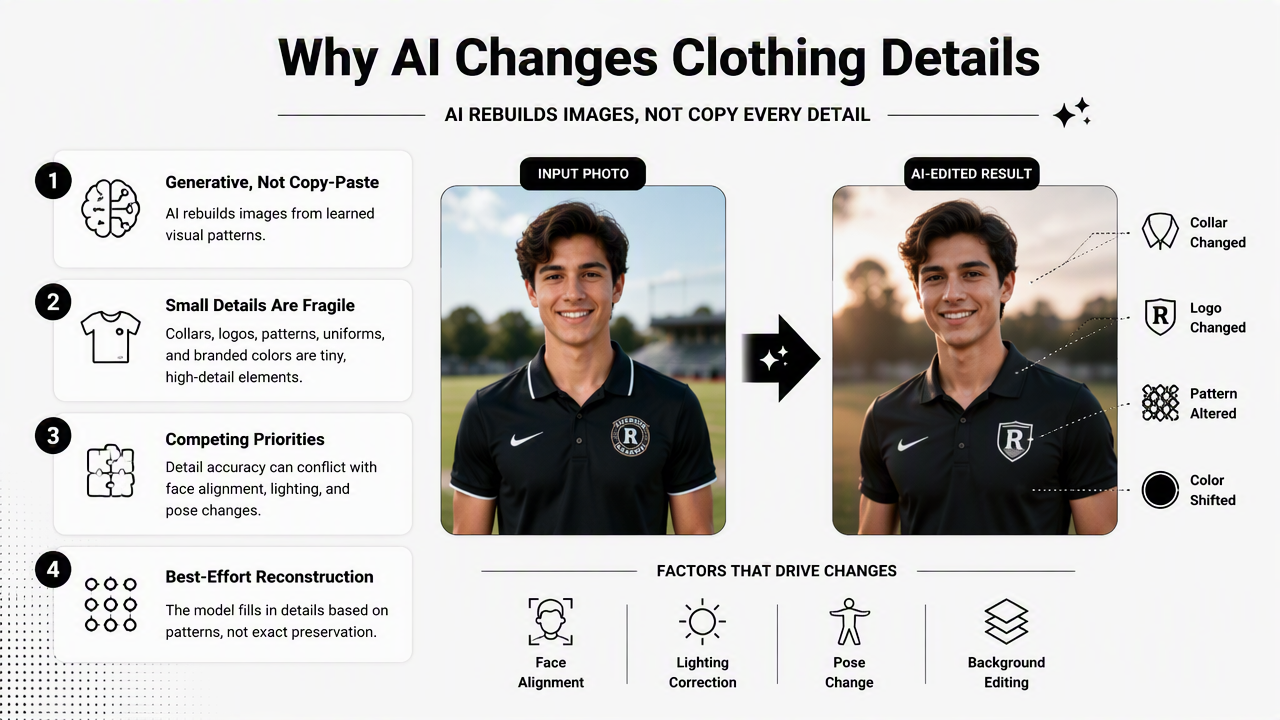
AI changes clothing details because generative models rebuild an image from learned visual patterns rather than preserving every garment feature exactly. Collars, logos, patterns, uniforms, and branded colors are small, high-detail elements that can conflict with face alignment, lighting correction, pose changes, and background replacement.
Common clothing elements that drift
The most fragile clothing areas sit near the neck, shoulders, and chest. These zones are close to the face, so the model often prioritizes facial realism and treats nearby fabric as supporting context.
- Collars: may become uneven, fused, too wide, or asymmetrical.
- Lapel lines: may curve in ways that real tailoring would not.
- Logos and badges: may be removed, blurred, invented, or changed.
- Patterns: stripes, checks, and fine prints can ripple or misalign.
- Uniforms: role-specific details can become generic or inaccurate.
- Brand colors: navy, charcoal, black, and deep green can shift under new lighting.
A multimodal model can understand long context and visual signals better than older systems, but understanding does not guarantee pixel-perfect garment reproduction. The 2024 Gemini 1.5 report by the Gemini team discusses multimodal understanding across large context windows, showing the direction of model capability without claiming exact visual preservation in every output: Gemini 1.5 report.
Clothing accuracy risk table
| Clothing element | Accuracy risk | Professional impact | Safer alternative |
|---|---|---|---|
| White shirt collar | Uneven edges or merged neckline | Looks sloppy in formal portraits | Crisp collar visible above jacket |
| Fine stripes or checks | Warping, moiré, broken lines | Looks obviously generated | Solid blue, gray, cream, or black |
| Company logo | Distorted letters or fake mark | Creates brand and trust issues | Plain clothing, add logo elsewhere |
| Medical or safety uniform | Missing role-specific details | Can misrepresent credentials | Use verified real photo when accuracy is required |
| Bright brand color | Hue shift under relighting | Weakens visual identity | Upload several examples with the exact color |
Solid colors win because they give the model fewer tiny details to reconstruct. A fitted blazer, simple blouse, fine-knit sweater, or clean crew neck usually produces a more stable result than busy fabric.
For profile use cases, Looktara LinkedIn resume headshots are best supported by outfits that communicate role and seniority without relying on small garment details. That means simple tailoring, clear contrast against the background, and no critical text on clothing.
How to choose source photos for accurate outfits?
To improve clothing accuracy, source photos should show the intended outfit clearly, consistently, and under clean lighting. The best inputs include visible shoulders, an unobstructed neckline, accurate color, and at least a few examples where the garment sits naturally on the body.
Source photo checklist before generation
A strong source set helps the model separate identity from clothing noise. The goal is not perfection, but consistency.
- Use 6 to 10 clear photos where the face and upper torso are visible.
- Include the preferred neckline in several images, such as blazer over shirt, sweater, or blouse.
- Avoid scarves, lanyards, hands, and hair covering the collar because these can become fused fabric.
- Choose daylight or soft indoor light so garment color is easier to infer.
- Keep clothing style consistent when a specific professional look is required.
- Skip mirror selfies with text reversal if logos or uniforms matter.
- Upload at least one straight-on image so shoulder symmetry is easier to render.
For entrepreneurs selling services or products, clothing should match the channel. A founder headshot for a store profile can feel polished without looking overly corporate. For that use case, AI headshots for Shopify profiles make the most sense when the source outfit already supports the brand tone.
Outfit choices that models handle best
Certain garments are simply easier for AI to render. They have broad shapes, predictable folds, and limited fine detail.
- Best for corporate roles: navy blazer, charcoal jacket, white or pale blue shirt.
- Best for creative roles: solid knit top, textured jacket, simple neutral layers.
- Best for founders: plain dark top with clean neckline, blazer optional.
- Best for remote workers: smart casual shirt, sweater, or jacket that frames the face.
- Best for dating profiles: authentic clothing that matches real daily style, not formal costumes.
A useful rule: if the garment would still look good slightly softened at thumbnail size, it is probably a safe AI headshot choice. If the garment depends on tiny lettering, badges, pinstripes, or exact stitching, accuracy risk rises.
How should AI headshot outputs be reviewed?
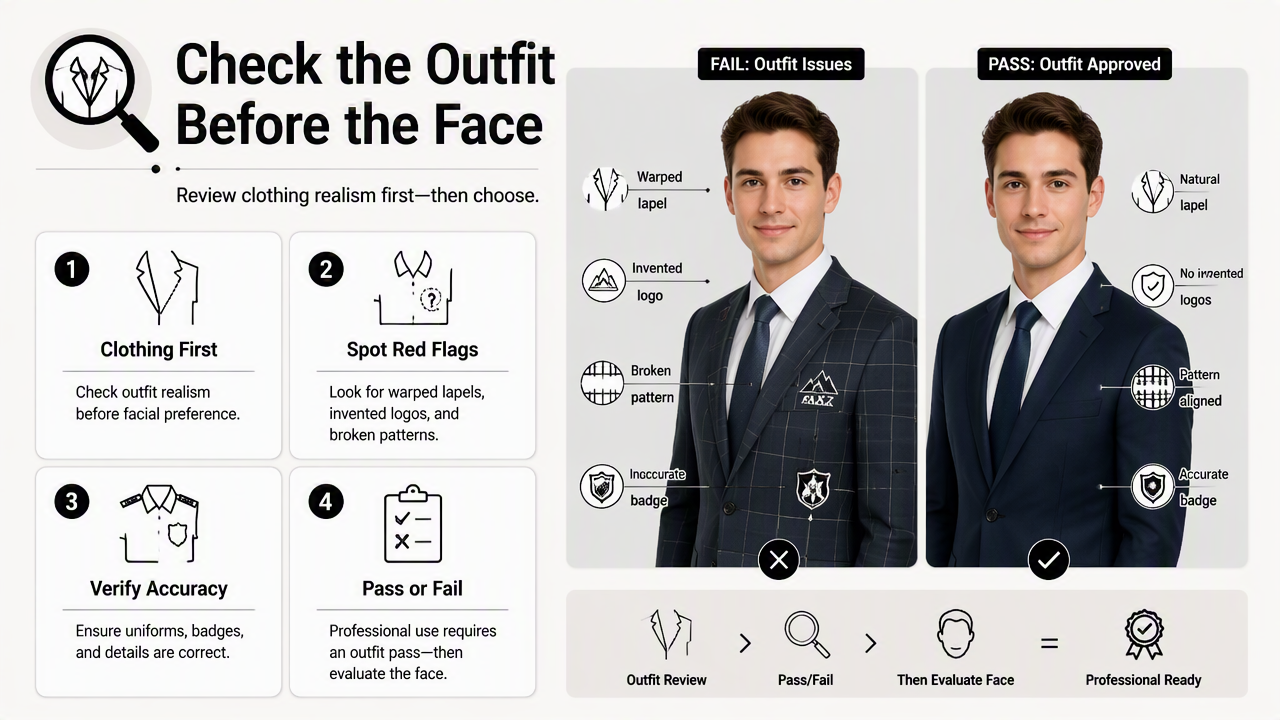
AI headshot outputs should be reviewed by checking clothing realism before facial preference. A flattering expression does not compensate for warped lapels, invented logos, broken patterns, or inaccurate uniforms. Professional use requires a pass-fail review of the outfit, not just a beauty ranking.
Rejection checklist for clothing errors
The following issues should usually disqualify an image from resumes, LinkedIn, company bios, media kits, and sales pages.
- Collar distortion: one side higher, melted, missing, or folded impossibly.
- Neckline confusion: shirt, skin, hair, and jacket blend together.
- Fake buttons or pockets: clothing details appear in impossible positions.
- Logo changes: letters become unreadable, offensive, or brand-inaccurate.
- Pattern warping: stripes bend around the chest or shoulders unnaturally.
- Uniform errors: badges, medical coats, service clothing, or safety gear look invented.
- Color mismatch: brand colors shift enough to look like a different company identity.
- Fabric artifacts: shiny patches, plastic texture, or repeated wrinkle shapes appear.
Practical standard: if the clothing detail would distract a recruiter, client, investor, or date within two seconds, the image should not be used.
Reviewing at multiple sizes helps. A portrait can look fine full screen but fail as a small avatar. The final test should include a desktop preview, mobile preview, and cropped square profile preview.
When exact clothing matters more than style
Some contexts need stricter standards than others. A consultant in a plain blazer needs believable polish. A doctor, pilot, military professional, chef, or construction leader may need exact clothing accuracy because uniforms imply credentials, safety standards, or official authority.
For newsletter authors and subject-matter experts, clothing accuracy still matters, but the signal is broader: credibility, warmth, and consistency. Newsletter-ready resume headshots work best when the outfit supports a repeatable personal brand across author bios, landing pages, and email footers.
Social platforms add another layer. Pinterest, creator profiles, and portfolio thumbnails reward visual clarity. A simple top with strong contrast often outperforms complicated fashion details because it stays readable in small cards. The same principle applies to Pinterest profile headshots, where outfit clarity can matter as much as facial expression.
What will clothing accuracy look like in 2027?
Clothing accuracy in 2027 will likely improve through stronger multimodal models, better source-photo guidance, and more controlled editing tools. The biggest gains will come from systems that can preserve selected garment regions while changing lighting, background, pose, and composition around them.
The direction is already visible. Current research focuses heavily on combining visual understanding with instruction following. In headshot tools, that progress points toward features such as garment lock, brand color preservation, collar repair, and side-by-side outfit consistency checks.
Still, exact logos and uniforms will remain sensitive. A model that invents or alters professional insignia can create reputational problems. The safest future workflow will pair AI generation with human review, especially for regulated roles or official company imagery.
Expected improvements and limits
| 2027 capability | Likely benefit | Remaining caution |
|---|---|---|
| Garment-region locking | Preserves jacket or shirt shape | May reduce style flexibility |
| Better color controls | Keeps brand colors closer | Screens and lighting still vary |
| Logo-aware editing | Reduces fake marks | Legal approval may still be needed |
| Uniform validation | Flags missing or odd details | Human review remains necessary |
| Batch consistency | Keeps outfits similar across images | Overly identical portraits can feel staged |
Looktara is positioned around practical professional headshots rather than costume-level fashion rendering. For most career, creator, and business profiles, that distinction is useful: the goal is a credible portrait that passes real-world profile review.
Anyone preparing a source set can head to looktara.com after selecting simple clothing, checking collar visibility, and deciding whether exact brand colors truly matter. That preparation step saves time because cleaner inputs produce cleaner options.
FAQ about AI headshot clothing accuracy
Can AI headshots keep the exact same outfit?
AI headshots can sometimes keep the same general outfit, but exact preservation is not guaranteed. The model may adjust the cut, fabric, neckline, or color to fit a new portrait style. For exact uniforms, logos, or branded apparel, a real edited photo is safer than a fully regenerated headshot.
Are logos safe to include in AI headshots?
Logos are risky because AI can blur, distort, remove, or invent lettering. A small chest logo may look harmless in the source image but become unreadable in the final output. For company profiles, plain clothing plus a separate verified brand mark on the page usually creates a cleaner result.
What clothing colors work best for AI headshots?
Solid navy, charcoal, black, cream, white, pale blue, and muted earth tones usually render more reliably than neon colors or busy prints. The best color depends on skin tone, background, and industry. High contrast between face, clothing, and background improves profile visibility.
Should AI headshots be used for uniforms?
Uniform headshots require caution because small details can imply real credentials or official status. If a uniform, badge, medical coat, or safety garment must be accurate, the output should be checked against a real reference image. Formal company or regulated-role portraits may need traditional photography.
Conclusion
Accurate clothing starts before generation, not after. The most reliable process is simple: choose clean source photos, favor solid fitted garments, avoid critical logos or intricate patterns, then reject any output with collar, color, logo, pattern, or uniform errors.
For polished profile images built around credible professional presentation, Looktara gives users a practical path from source photos to finished headshots. The next step is to gather 6 to 10 outfit-consistent images, remove anything that must be reproduced exactly, and visit looktara.com when ready to create a professional set.
Generated by EarlySEO.com